Over the years I’ve come across a number of sources and log files that provides some insight into what is on North Korea’s Kwangmyong. If you’re not familiar, North Korea has an intranet inside the country which is what most people access. I’ve cleaned up my notes and started putting down everything that I have here: https://nkinternet.com/kwangmyong/
Additional notes are always welcome, and anything that can’t be confirmed or I am unsure of is noted with a series of question marks by the potential purpose for the IP/website.
A recent post by Hudson Rock detailed information derived from infostealer logs tied to activity associated with the Trevor Greer persona, you know the one trevorgreer9312@gmail[.]com. That write up provides some context around the data and places it with broader reporting on North Korean IT worker activity. If you haven’t seen it, the article can be found here:
Before going further it’s worth clarifying that just having the presence of a DPRK linked persona in some infostealer logs does not mean that this is directly connected to the Bybit incident itself. Additionally, much of the data appears to be over a year old. AT this point, it is unclear whether the logs were recently leaked or simply just discovered.
However there are still several details in the logs that have not been discussed so far and are worth highlighting.
Software
One of the more notable findings in the logs is the list of processes running on the machine, including:
CallRT.exe
Call.exe
Call3.0.exe
These binaries appear to be purpose built utilities associated with DPRK ITW environments. While I’m working on a deeper reverse engineering post at a high level this software appears designed to support application and hiring workflows. Additionally the tool appears to include some keylogging functionality that triggers on specific keywords, as well as providing a way to track where a user is logged in when they first connect with the software.
CallRT.exe software and the Call.exe and CallRT.exe icons
BlockBounce LLC
The company BlockBounce LLC is also briefly mentioned in the data. The address associated with the company points to an apartment complex in Atlanta:
860 Glenwood Ave SE Apt 409 Atlanta, Georgia 30316 United States
This address is most likely a fake address and should not be treated as definitive evidence of anything on its own. However, the use of residential addresses for shell entities is consistent with patterns seen in other DPRK linked operations.
Additional Identities
In addition to the Trevor Greer persona, the same environment appears to reference other identities, including the name Yeferson Mejia using the email jaider@blockbounce.org. Emails suggest communication with an external service related to recruitment for BlockBounce on an AI-Powered interview platform:
GitHub Account
The username topsdev126 appears in the logs and is also referenced in the Hudson Rock article. That username is associated with a GitHub account, which still exists at the time of writing, though it shows little visible activity:
On its own, the existence of the account does not indicate active use. However, the same username also appears in logs from a commercial proxy provider:
Logs showing user topsdev126
It is difficult to determine from this data alone whether the proxy account is still actively being used or simply remnants of older activity.
While none of these points stand out on their own, combined with other data they may add context to aspects of the data that has not been covered in other write ups.
Before we go any further, one thing that I want to make clear is that the word assume is going to be doing some heavy lifting throughout this post. This was a rabbit hole that I recently went down and I probably have more questions than answers, but I still wanted to document what I had found so far. If you have additional information or findings you want to share, as always feel free to reach out: contact@nkinternet.com.
It all started with a PowerPoint that I came across a few weeks ago. It was presented by the DPRK to the ICAO on the state of their aviation industry and their ADS-B deployment inside North Korea. However, one slide in particular caught my eye because it showed a fiber optic cable running across the country
You can find a full link to the presentation here.
This got me wondering more about the physical layout of the network inside North Korea. From the map we know that there’s a connection between Pyongyang and Odaejin, although given the mountains in the middle of the country it probably isn’t a direct link. There isn’t a lot of information on fiber in North Korea, but there are a few outside sources that help provide clues about how things might be laid out.
Historic Fiber Information
38North first reported the connection from Russia’s TTK to the DPRK over the Korea–Russia Friendship Bridge back in 2017. Additionally, a picture found on Flickr looking toward Tumangang after the bridge doesn’t show any utility poles and instead seems to display some kind of infrastructure in the grass to the side of the tracks. Assuming this interpretation is correct, the fiber is likely buried underground as it enters the country and passes through the vicinity of Tumangang Station.
From user Moravius on Flickrwhich appears to show possible infrastructure in the grass. The white pole on the right side of the tracks are used as distance markers.
According to a report from The Nautilus Institute we can gather a few additional details about the internet inside North Korea
One of the first lines was installed in September 1995 between Pyongyang and Hamhung
In February 1998 a link between Pyongyang and Sinuiju was completed
As of 2000, DPRK’s operational optical fiber telecom lines included: Pyongyang – Hamhung; Pyongyang – Sinuiju including all cities and counties in North Pyongan Province; Hamhung Rajin-Sonbong; Rajin-Songbong – Hunchun (China), Pyongyang – Nampo.
In 2003 the original domestic cell phone network was built for North Korean citizens in Pyongyang, Namp’o, reportedly in all provincial capitals, on the Pyongyang-Myohyangsan tourist highway, and the Pyongyang-Kaesong and Wonsan-Hamhung highways
The Kwangmyong network’s data is transmitted via fiber optic cable with a backbone capacity of 2.5 GB per second between all the provinces.
Based on these notes, it starts to paint a picture that the fiber link coming from Russia likely travels down the east coast of the DPRK before connecting to Pyongyang. Several city pairs—Pyongyang–Hamhung and Rajin–Sonbong—line up with earlier deployments of east-coast fiber infrastructure.
Kwangmyong Internal Topology
The report also notes that all of the provinces in North Korea were connected to the Kwangmyong via fiber. The Kwangmyong for those not familiar is the intranet that most citizens in the DPRK can access as they do not have access to the outside internet. While not much information is available about the Kwangmyong, these notes from Choi Sung, Professor of Computer Science at Namseoul University provides some additional details on how the network is laid how, as well as information on the regional networks that are connected. A map provided in his notes shows some of the main points of the Kwangmyong with three of them located along the northeast of North Korea.
Railways, Roads, and Practical Fiber Routing
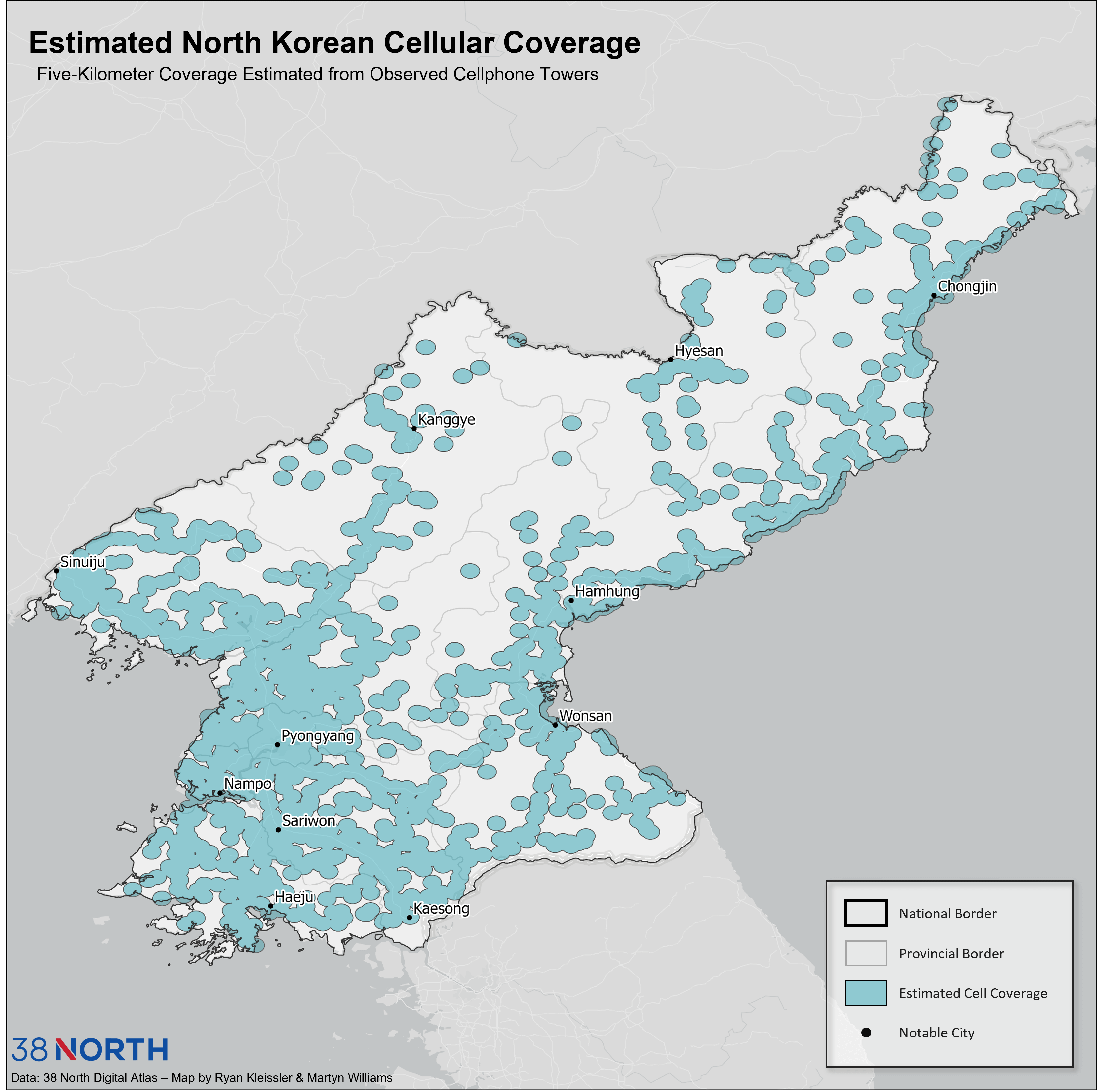
This starts to paint a rough picture of how the network is physically deployed in North Korea but we can also look to some outside sources to get some confirmation. 38North once again provides some great detail on cell phone towers in North Korea. The interesting thing being an apparent line down the east coast which follows major roads and highways but would also in theory have easier access to the fiber back haul to support the cell network.
All of this seems to suggest that the fiber lines were run along major roads and railways up the east coast. A map from Beyond Parallel shows the major rail lines, which has the Pyongra line up the east coast.
Looking For Clues Along the Railway
Some additional digging for pictures from along the line suggest that there is infrastructure deployed along the tracks, although it’s difficult to confirm from pictures exactly what is buried. The following shows what appears to be a junction box at the base of a pole along the line.
Picture from Flickr user josephferris
The line does have a path along it as well with mile markers. While it is used by bikes and pedestrians, it provides a nice path for supporting fiber and other communications runs along the tracks.
Picture from Flickr user Andrew M. showing paths along the line.
The Pyongra line also crosses through the mountains at points but it is assumed at certain junctions the fiber was laid along the AH 6/National Highway 7 up the coast as there are parts of the line discovered that do not have a path along the tracks. In these places it is assumed they follow the road, although finding pictures of the highway to further examine is challenging.
Pyongra line through the mountains. At these points it’s assumed that the fiber optic cables are laid along roads/highways instead of the right of way along the railroad.
Lastly at certain stations we can see utility boxes along the side of the track suggesting buried conduits/cables are laid along the tracks.
From a video taken in 2012 there does appear to be some signs of objects along the tracks, although difficult to confirm due to the video quality. The screenshot below is the clearest I could find of a rectangular box buried in a clearing along the line.
From Flickr user Andrew M. Screenshot is from ~21 seconds in the linked video
Based on this information of what is confirmed and looking at major cities, it appears there is a route that follows Pyongyang → Wonsan → Hamhung → Chongjin → Rajin → Tumangang which follows the Pyongra line as well as the AH 6/National Highway 7 up the coast. The following map highlights a rough path.
Interestingly by mapping out the possible fiber locations we can start to draw conclusions based on other sources. According to a video by Cappy’s Army he proposes that when the US Navy Seals landed in NOrth Korea in 2019 the most likely place this would have occurred is Sinpo. As the goal was to depoy a covert listening device this could also line up with supporting the idea that a fiber backbone runs down the east coast of North Korea as Sinpo would be relatively close.
What Does This Mean For the Network?
In addition to the fiber link via Russia, the other fiber optic cable into North Korea comes in via China by way of Sinuiju and Dandong. Although we don’t know for sure where servers are deployed inside North Korea, based on the map of Kwangmyong the first assumption is that things are mainly centralized in Pyongyang.
Out of the 1,024 IPs assigned to North Korea we observe the following behavior based on the CIDR block:
175.45.176.0/24 is exclusively routed via China Unicom
175.45.177.0/24 is exclusively routed via Russia TransTelekom
175.45.178.0/24 is dual-homed and can take either path before crossing into North Korea
With this information in mind, running a traceroute with the TCP flag set gives us a slightly better look at how traffic behaves once it reaches the country. For the following tests we’re going to assume there is a fiber path on the west coming in from China toward Pyongyang, as well as a path on the east side coming from Russia.
From the US east coast to 175.45.176.71, the final hop in China before entering North Korea shows roughly 50 ms of additional latency before reaching the DPRK host. This suggests there may be extra devices, distance, or internal routing inside the country before the packet reaches its final destination.
10 103.35.255.254 (103.35.255.254) 234.306 ms 234.082 ms 234.329 ms
11 * * *
12 * * *
13 * * *
14 175.45.176.71 (175.45.176.71) 296.081 ms 294.795 ms 294.605 ms
15 175.45.176.71 (175.45.176.71) 282.938 ms 284.446 ms 282.227 ms
Interestingly, running a traceroute to 175.45.177.10 shows a similar pattern in terms of missing hops, but with much lower internal latency. In fact, the ~4 ms difference between the last Russian router and the DPRK host suggests the handoff between Russia and North Korea happens very close—network-wise—to where this device is located. This contrasts with the China path, which appears to take a longer or more complex route before reaching its final destination.
10	188.43.225.153	185.192 ms	183.649 ms	189.089 ms
11	 * 	 *
12	 * 	 *
13	 * 	 *
14	175.45.177.10	195.996 ms	186.801 ms	186.353 ms
15	175.45.177.10	188.886 ms	201.103 ms	193.334
If everything is centralized in Pyongyang this would mean the handoff from Russia is completed in Pyongyang as well. However, it could also indicate that 175.45.177.0/24 is not hosted in Pyongyang at all and is instead located closer to the Russia–North Korea border. More testing is definitely required however before any conclusions can be drawn about where these devices physically reside.
What can we learn from all of this?
Making some assumptions we can get a better idea of how the internet works and is laid out inside North Korea. While not much is officially confirmed using some other sources we can get a possible idea of how things work. As mentioned at the start, the word assume does a lot of heavy lifting. However if you do have other information or ideas feel free to reach out at contact@nkinternet.com
While it’s pretty well known that the DPRK is assigned ASN131279 there are a handful of other ranges that they seemingly have access to. Based on the names these appear to be assigned to the DPRK via Russia TransTelekom
CIDR
ASN
Netname
Company
62.33.81.0/24
20485
KPOST-NET
TTK-DV
80.237.84.0/24
20485
KPOST-NET
TTK-DV
188.43.88.0/24
20485
KPOST-NET
TTK-DV
188.43.136.0/24
20485
KPOST-NET2
TTK-DV
And while not as explicitly named they are also using
45.126.3.0/24
134544
Cenbong Int’l Holdings
These make sense as both 20485 and 134544 are upstream peers of ASN 131279
There are also a handful of other ranges that they are leveraging. The first two are also part of TTK and the final one I haven’t seen evidence of being in use but the abuse contact email for the IPs are postmaster@silibank.com and the company listed is Liaoning Clear channel data Communication, Inc which is right over the border from the DPRK in China.
80.237.87.0/24
20485
SKYFREIGHT-NET
83.234.227.0/24
20485
SKYFREIGHT-NET
218.25.43.208/28
4837
China Unicom
Now, I’ve been working on some more detailed infrastructure write ups but one thing that stood out last year was a note on an ITW account that listed information about proxying traffic via Russia and Hong Kong. Note is below:
The following IPs are also used for traffic leaving the country via NetKey/OConnect
In Lumen’s 2024 Smart Phones of North Korea report the Arirang 182 was noted as not having a lot of information currently available about it, so it seemed like a good time to see if we can learn more about the phone.
I recently had an opportunity to acquire the phone which included the complete box and packaging. I put a picture up on twitter when it came in but I’ve had some more time to look over the phone a little more.
Front and side of the box
According to the side of the box the phone has a 2.4 inch screen with a resolution of 320×240. While the cameras are not great one thing of note is that the side shows that the phone is IP68 rated. This appears to be designed as a rugged phone. This is also shown on the other side of the box which shows that the phone can be dropped from a height of 2m and survive being under water up to a depth of 1.5m.
The front and back of the phone have the Arirang logo. The back also has IP68 on the back of the phone. The two screws on the back plate of the phone are where the battery and SIM card are inserted which seems to be in line with the rugged design of the phone. There is also a texture on the front and side of the phone for easily holding the phone.
Menu screenError trying to access the internet
I was able to get the phone into English and digging through some of the settings shows some interesting options. Connecting to the internet is not available on the phone even with a SIM card in the phone. There is also a certificate manager in there which assuming would have additional certificates loaded from DPRK when activated in the country.
The box also came with the full set of accessories. The small key is for taking off the back plate to install the battery and SIM card.
While the back camera doesn’t produce the best pictures one interesting thing was transferring photos between the phone and my phone. I was able to share the photo I took over Blutetooth to my phone but trying to share the photo back over Bluetooth resulted in an error each time when I tried to transfer any photo. This seems to be similar to behavior observed on other DPRK Android phones that block outside media.
Cards for tracking repairs
Some interesting notes from inside the manual:
For questions about the phone and a users subscription they can dial 999
No warranty on the phone
Manual calls out specifically sharing vcf files for sharing contacts.
If you haven’t seen part 1, it provides an overview of the service as well as the domains and IPs supporting the infrastructure.
Continuing my analysis of the Hangro VPN IPs and service I started querying the IPs directly as well as started taking some first steps towards reversing an older sample of the Hangro VPN client. Using OpenSSL as well as a few other tools provided some additional details on how the VPN functions. This post dives further into how the Hangro client authenticates, as well as some recent sightings of Hangro in the wild.
Handshake Failures
Across the four IPs 175.45.176.21, 175.45.176.22, 188.43.136.115, and 188.43.136.116 they all share a common certificate on port 7443. For the sake of brevity I’ve posted a few snippets throughout the post, the full certificate will be available at the end. Querying these IPs directly resulted in a handshake failure.
# openssl s_client -connect 175.45.176.21:7443 -tls1_2

CONNECTED(00000003)
Can't use SSL_get_servername
depth=0 CN = hangro.net.kp
verify error:num=20:unable to get local issuer certificate
verify return:1
depth=0 CN = hangro.net.kp
verify error:num=21:unable to verify the first certificate
verify return:1
depth=0 CN = hangro.net.kp
verify return:1

40B0FA76:error:0A00007B:SSL routines:tls_process_key_exchange:bad signature:../ssl/statem/statem_clnt.c:2306:

Certificate chain
0 s:CN = hangro.net.kp
i:CN = hrra2024
a:PKEY: id-ecPublicKey, 384 (bit); sigalg: ecdsa-with-SHA384

v:NotBefore: May 27 03:39:46 2024 GMT; NotAfter: May 26 03:39:46 2029 GMT
We can see that the server responds with a certificate CN = hangro.net.kp and is signed by hrra2024 which could be assumed to be an internal CA. In this case, our query fails as OpenSSL doesnt have the full certificate chain and can’t verify the signature.
Hangro client
Reverse Engineering the Hangro Client
To get a better idea of how the VPN client works I started reverse engineering an older sample that I had. This resulted in several interesting findings into how the client authenticates:
Local certificate retrieval. Before the connection to the Hangro server is initiated the client connects to 127.0.0.1 over a local socket on port 6279 to retrieve a PEM-encoded certificate
Local certificate validation. Before the initial TLS handshake is initiated the client validates the certificate retrieved in step 1 locally and if it doesn’t pass the built-in checks the client will not attempt to connect to the Hangro server.
GOST cipher references. There are multiple strings referecing GOST algorithms which suggest potential Russian influence. These appear several times where the client intializes and enumerates cipher suites
        "gost94"
        "GOST R 34.10-94"
        "GOST89"
External authentication libraries. One of the DLLs imported FT_ET99_API.dll has several imported functions that suggest external authentication may be used. In addition there is code that tries to run USBToken.exe
Contents of the Hangro directory. There’s also a separate updater application
Additional testing
With some more details on how the client works, the first thing that I tried was installing GOST cipher suites to see if that had any different results when connecting. This just shows that the sever currently doesnt support GOST:
openssl s_client -connect 175.45.176.21:7443 -cipher GOST2001-GOST89-GOST89
CONNECTED(00000003)

4080FA76:error:0A000410:SSL routines:ssl3_read_bytes:sslv3 alert handshake          failure:../ssl/record/rec_layer_s3.c:1605:SSL alert number 40

no peer certificate available

No client certificate CA names sent

SSL handshake has read 7 bytes and written 255 bytes

Verification: OK

New, (NONE), Cipher is (NONE)
Secure Renegotiation IS NOT supported
Compression: NONE
Expansion: NONE
No ALPN negotiated
Early data was not sent

Verify return code: 0 (ok)
Attempting to connect to the Hangro server
Generating a test certificate
Since I had a decrypted private key I attempted to generate a self-signed certificate to see if it would proceed further. In this case the handshake progressed beyond ServerHello but failed during the signature verification which confirmed that the server expects the certificate to be signed by hrra2024
Interestingly when using gnuTLS and digging into it further revealed the following which shows the Hangro server’s certificate was flagged for Client Authentication but is lacking the Server Authentication purpose
looking for key purpose '1.3.6.1.5.5.7.3.1', but have '1.3.6.1.5.5.7.3.2'
Is Hangro still used today?
The sample that I have appears to be a few years older but one thing that Ive been wondering is if Hangro is still in use. Trend Micro wrote a great blog that goes into detail about the link between Russia and the DPRK (thanks for the shout out!)
Several people actually recently wrote in and shared that the Hangro icon has recently appears on the site https://ps.ppokkugi.com
Green Hangro icon on Ppokkugiwebsite
Even more interesting is the source code on the page that notes that the icon is a “service for visitors away from home”
<img src="/imgsrvc?i=hangro" title="조국으로부터 떨어져계시는 방문자들을 위한 봉사" onclick="openPage('오유!관리부에련락하십시오!')">
This seems to provide further support the idea that Hangro is a VPN client used by North Koreans overseas to establish connectivity back to the country.
Interestingly, as of around July 18 2025 the Hangro icon no longer appears on the site.
Going Forward
From this it looks like Hangro uses mTLS to support authentication as part of the VPN service and requires a valid certificate signed by hrra2024. I haven’t been able to find if the cert requested on the client on port 6279 is part of Hangro or a different service that needs to be running.
Based on what has been discovered so far and looking through some of the other files and a few packet captures it looks like Hangro is derived from SoftEther an open source VPN project maintained by the University of Tsukuba. The included driver that is installed matches with SoftEther and the traffic seems to be similar to the Ethernet over SSL option in SoftEther.
There’s also additional applications like a chat and mail program that are installed as well that could have some interesting information.
Hangro chat client
There’s still more to explore regarding Hangro’s capabilities. A third part is definitely going to be required to go over some of the functions in Hangro that may provide some additional clues as to what a user is able to access once authenticated. If anyone has any up to date samples that they can share please reach out. And of course if you’re a security company or a three letter agency feel free to reach out as well contact@dprkinternetwatch.com
Last year we discovered a North Korean server that was hosting numerous animation files. I wanted to share a more detailed write-up about how we discovered the server, as well as some more details about what we found. You can read the original coverage here: What We Learned Inside a North Korean Internet Server
The Initial Discovery
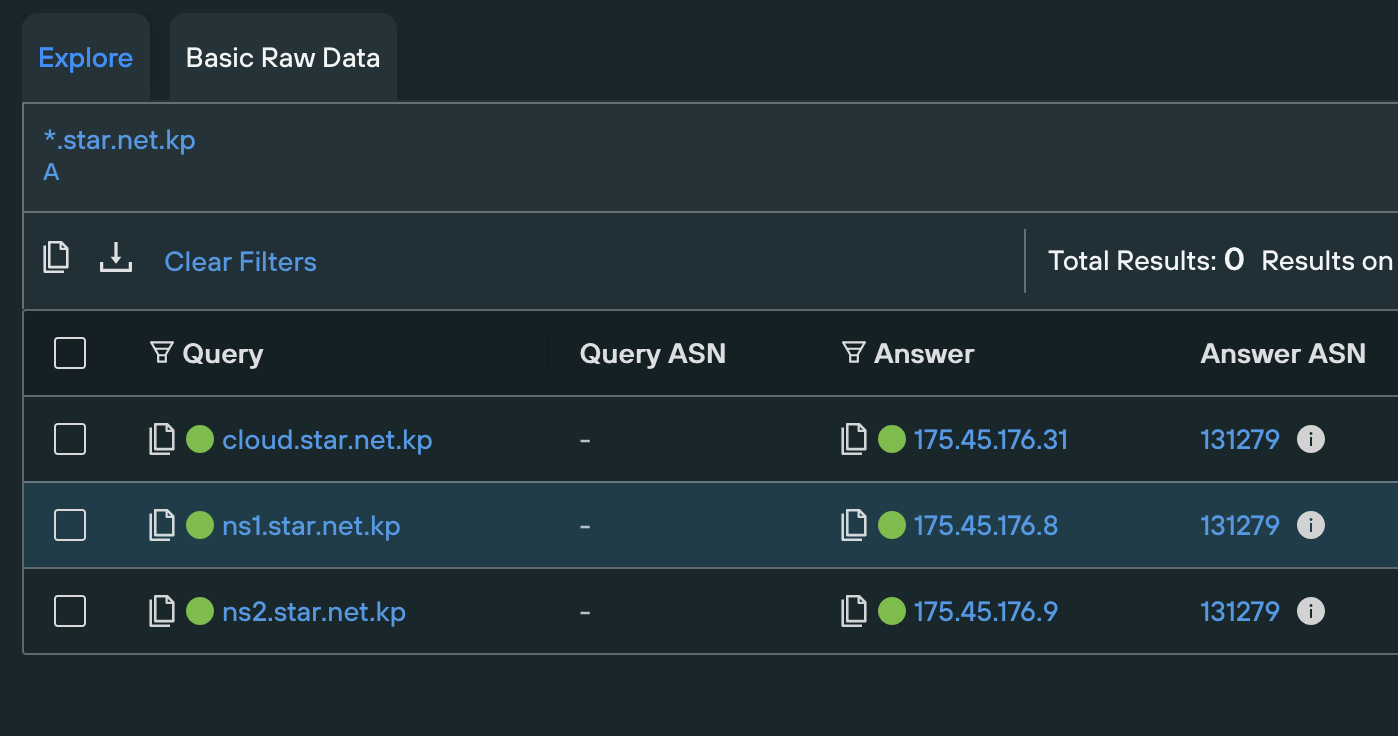
It began at the end of 2023 when I noticed a new DNS record for the domain cloud.star.net.kp which resolved to the IP address 175.45.176.31. At that time I had published a short post about an exposed ownCloud instance running on a North Korean IP: Exposed Nextcloud Instance
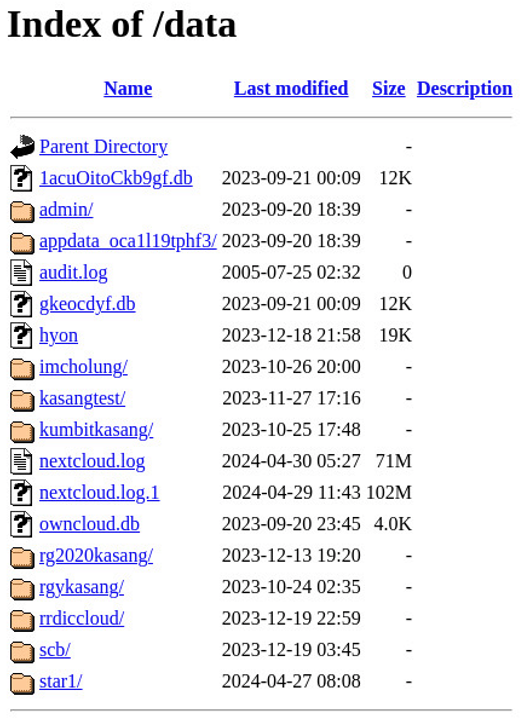
While browsing to the IP directly returned an error page, browsing several common directories revealed several folders that were accidentally exposed, the most notable of which was /data
What Was Exposed
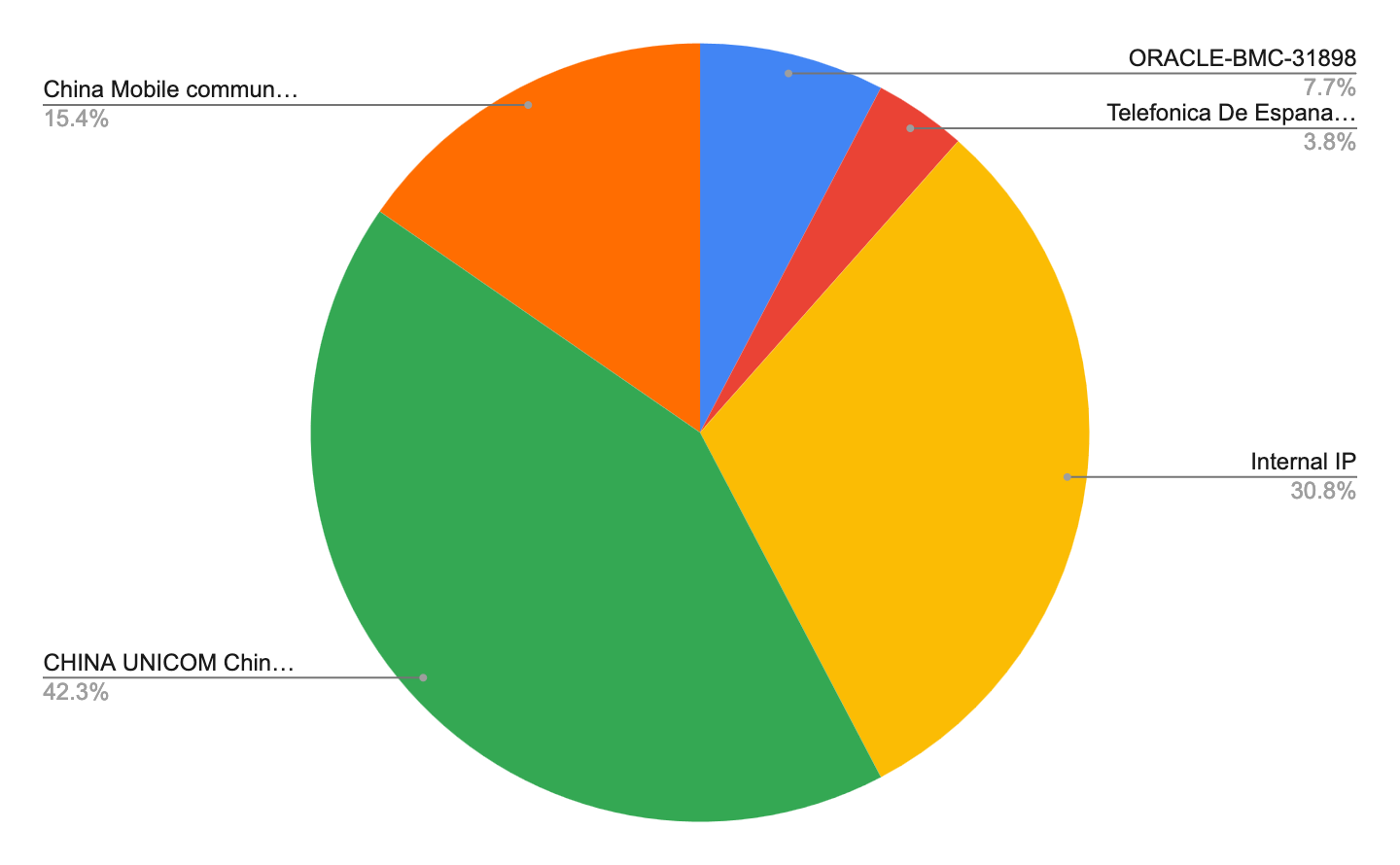
The /data directory provided access not only to all of the files for each user but access to the server logs as well. These logs provided additional insights into user activity and where these users were logging in from.
There were several logins that originated from RFC-1918 addresses suggesting users logging in from inside North Korea. In addition to these logins there were several other ASNs that we observed activity from outside of the DPRK
Failed Logins and Suspicious Activity
The logs showed repeated failed login attempts from the following IP blocks
104.234.140.0/24
85.203.21.0/24
Interestingly the login attempts were using valid usernames and all shared the same user-agent of test, suggesting that this could have been automated attempts but unclear whether they were malicious or benign.
Outside of the users listed in the directory there were also a number of interesting failed logins associated with several usernames:
시험 (test)
komogeco
asd
최현성 (Hyunseong Choi)
test-m
tkhyp@star-co.net.kp
T-81vr-m
jcg0123
pkitc@silibank.net.kp
pyitc
pkitc@star-co.net.kp
hyon
kitc@star-co.net.kp
imcholung
kitc
VPN Usage
Further analysis of the logs revealed that several of the logins were made with IPs associated with Express VPN as well as VPN Gate which is a free VPN service run by the Univ of Tsukuba in Japan.
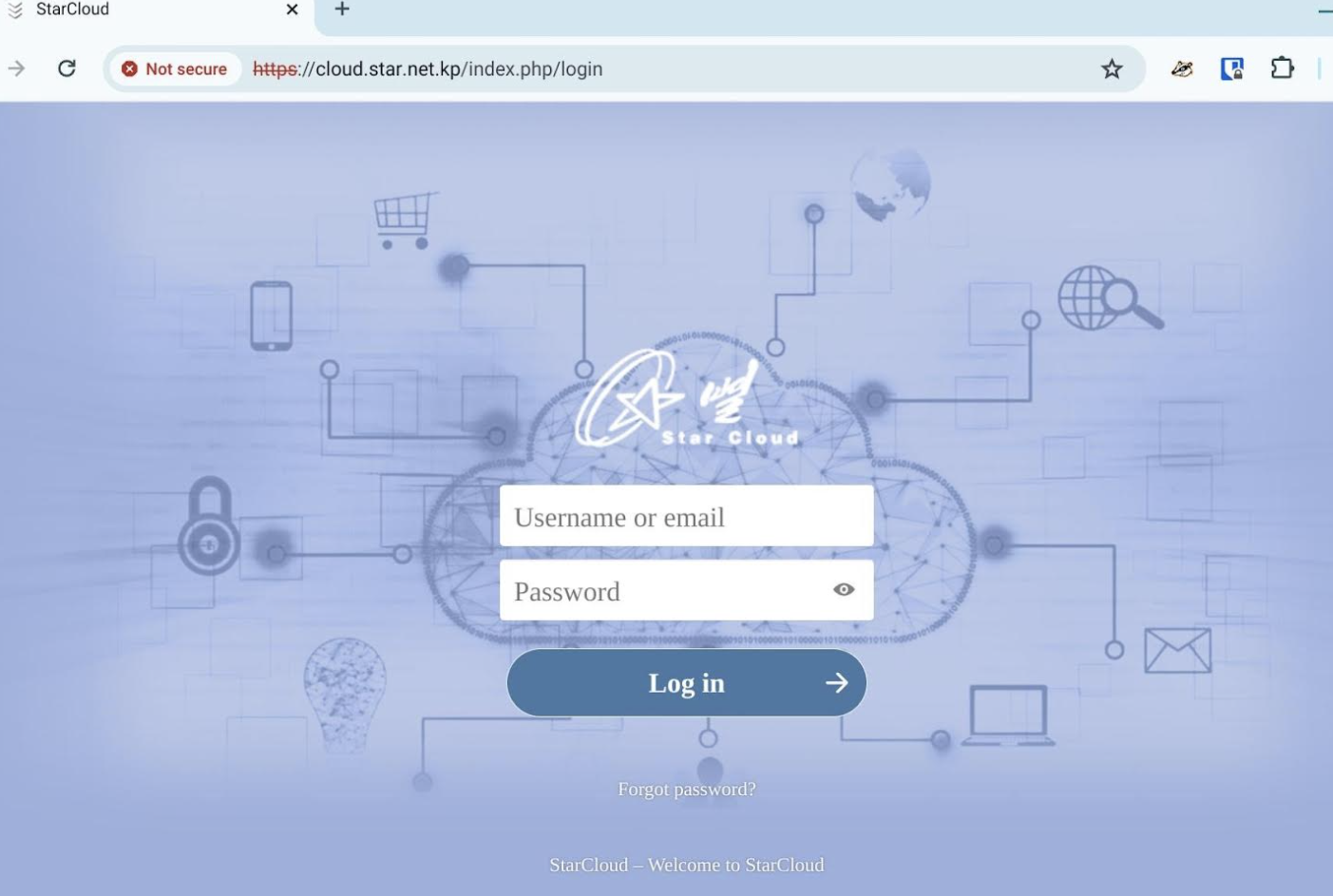
Notably when accessing cloud.star.net.kp through VPN Gate we were able to connect to a login page for the ownCloud instance.
How Long Did It Stay Online?
With all of the coverage of the server I had also written a script to track how long it remained online for after all of the articles were published. The original stories were published on April 22nd, but it wasn’t until April 27th that all of the files associated with the user star1 were deleted but the open directory remained exposed. By April 30th some log files were throwing errors when attempting to access but the remaining data was still available. It wasn’t until May 8th around 6 AM GMT that we finally lost all access to the server.
I’ve uploaded a small sample of the files here. The full server contained approximately 250 GB of data. If you’re interested in reviewing the full dataset please reach out. In Part 2, I’ll go into more detail about the contents of the files and some of the more interesting material that we uncovered.
It’s not really a secret that North Korean IT workers are using GitHub for a number of reasons. While there are several posts that cover different clusters of users as well as why they are using GitHub, there aren’t many posts on finding accounts on GitHub.
Let’s take a step back and start to look for possible accounts online that might be related to IT workers interests. https://playerpuff.com is a website that allows users to buy and sell Upwork accounts and if we filter by users that are looking to buy an account on Upwork we find a post like this
From this post we can see the user Rionel has a Telegram account athene9101
Searching athene9101 on GitHub reveals an account that looks quite active over the last year
However if we dig into this slightly we can see that the account was created in February of 2025. This is something common amongst ITW on GitHub as they try to make their profiles look older and more legitimate.
So this is looking suspicious but how can we confirm that this is a North Korean profile? There are typically several things to look for. A lot of accounts will follow each other creating a cluster, the naming conventions all look similar, and the images for the profiles are generally AI generated. Usually there are also repos for assessments, blockchain/bitcoin, and MERN stack developers.
In this case there are a number of followers that start to look similar. Now if we look at the user code-star-123 and the repo under his account with the same name we can see that the accounts that starred it are all similar to followers that we can find from our original account.
Additionally searching through the repos of these users reveals messages and resumes that can be collected for additional hunting outside of GitHub.
On March 18, 2025, at around 9:38 AM UTC, connectivity to AS131279 dropped. Shortly after, at 9:50 AM UTC, a change in the Start of Authority (SOA) record and an update to the Route Origin Authorization (ROA) were detected.
The update introduced a new ROA for 175.45.176.0/22, authorizing AS131279 as the origin but setting a maximum prefix length of /22. Previously, AS131279 had been announcing four /24s (175.45.176.0/24, 175.45.177.0/24, etc.), which had not been marked as invalid. After the change, these /24s exceeded the allowed length and were classified as RPKI Invalid.
Looks like as of 2025-03-19 02:15 UTC everything is coming back online. It is interesting however that it took 17 hours between when the initial connections dropped and when everything came back online.








 North Korean Internet