Hangro: Investigating North Korean VPN Infrastructure Part 2

If you haven’t seen part 1, it provides an overview of the service as well as the domains and IPs supporting the infrastructure.

Continuing my analysis of the Hangro VPN IPs and service I started querying the IPs directly as well as started taking some first steps towards reversing an older sample of the Hangro VPN client. Using OpenSSL as well as a few other tools provided some additional details on how the VPN functions. This post dives further into how the Hangro client authenticates, as well as some recent sightings of Hangro in the wild.

Handshake Failures

Across the four IPs 175.45.176.21, 175.45.176.22, 188.43.136.115, and 188.43.136.116 they all share a common certificate on port 7443. For the sake of brevity I’ve posted a few snippets throughout the post, the full certificate will be available at the end. Querying these IPs directly resulted in a handshake failure.

# openssl s_client -connect 175.45.176.21:7443 -tls1_2

CONNECTED(00000003)
Can't use SSL_get_servername
depth=0 CN = hangro.net.kp
verify error:num=20:unable to get local issuer certificate
verify return:1
depth=0 CN = hangro.net.kp
verify error:num=21:unable to verify the first certificate
verify return:1
depth=0 CN = hangro.net.kp
verify return:1

40B0FA76:error:0A00007B:SSL routines:tls_process_key_exchange:bad signature:../ssl/statem/statem_clnt.c:2306:

Certificate chain
0 s:CN = hangro.net.kp
i:CN = hrra2024
a:PKEY: id-ecPublicKey, 384 (bit); sigalg: ecdsa-with-SHA384

v:NotBefore: May 27 03:39:46 2024 GMT; NotAfter: May 26 03:39:46 2029 GMT

We can see that the server responds with a certificate CN = hangro.net.kp and is signed by hrra2024 which could be assumed to be an internal CA. In this case, our query fails as OpenSSL doesnt have the full certificate chain and can’t verify the signature.

Hangro client

Reverse Engineering the Hangro Client

To get a better idea of how the VPN client works I started reverse engineering an older sample that I had. This resulted in several interesting findings into how the client authenticates:

  • Local certificate retrieval. Before the connection to the Hangro server is initiated the client connects to 127.0.0.1 over a local socket on port 6279 to retrieve a PEM-encoded certificate
	push    offset cp       ; "127.0.0.1"
	call    ds:__imp_inet_addr
	mov     dword ptr [ebp+name.sa_data+2], eax
	push    1877h           ; hostshort
	call    ds:__imp_htons
	mov     word ptr [ebp+name.sa_data], ax

	push offset "-----BEGIN CERTIFICATE-----"
	call sub_4117A0
  • Embedded private key. There’s also an embded private key in the client that is decrypted with the password 1234
        mov     ecx, 53h ; 0x53 * 4 bytes = 332 bytes
        mov     esi, offset aBeginEncrypted ; "-----BEGIN ENCRYPTED PRIVATE KEY-----"
        lea     edi, [ebp+Src]
        
        push    offset a1234         ; "1234"
        mov     eax, [ebp+lpMem]
        push    eax                  ; context with the encrypted PEM
        call    sub_424A30           ; decrypts the private key
        add     esp, 4
  • Local certificate validation. Before the initial TLS handshake is initiated the client validates the certificate retrieved in step 1 locally and if it doesn’t pass the built-in checks the client will not attempt to connect to the Hangro server.
  • GOST cipher references. There are multiple strings referecing GOST algorithms which suggest potential Russian influence. These appear several times where the client intializes and enumerates cipher suites
        "gost94"
        "GOST R 34.10-94"
        "GOST89"
  • External authentication libraries. One of the DLLs imported FT_ET99_API.dll has several imported functions that suggest external authentication may be used. In addition there is code that tries to run USBToken.exe
        et_FindToken
        et_OpenToken
        et_Verify
        et_ChangeUserPIN
        et_CloseToken
Contents of the Hangro directory. There’s also a separate updater application

Additional testing

With some more details on how the client works, the first thing that I tried was installing GOST cipher suites to see if that had any different results when connecting. This just shows that the sever currently doesnt support GOST:

openssl s_client -connect 175.45.176.21:7443 -cipher GOST2001-GOST89-GOST89
CONNECTED(00000003)

4080FA76:error:0A000410:SSL routines:ssl3_read_bytes:sslv3 alert handshake          failure:../ssl/record/rec_layer_s3.c:1605:SSL alert number 40

no peer certificate available

No client certificate CA names sent

SSL handshake has read 7 bytes and written 255 bytes

Verification: OK

New, (NONE), Cipher is (NONE)
Secure Renegotiation IS NOT supported
Compression: NONE
Expansion: NONE
No ALPN negotiated
Early data was not sent

Verify return code: 0 (ok)
Attempting to connect to the Hangro server

Generating a test certificate

Since I had a decrypted private key I attempted to generate a self-signed certificate to see if it would proceed further. In this case the handshake progressed beyond ServerHello but failed during the signature verification which confirmed that the server expects the certificate to be signed by hrra2024

error:0A00007B:SSL routines:tls_process_key_exchange:bad signature

Interestingly when using gnuTLS and digging into it further revealed the following which shows the Hangro server’s certificate was flagged for Client Authentication but is lacking the Server Authentication purpose

looking for key purpose '1.3.6.1.5.5.7.3.1', but have '1.3.6.1.5.5.7.3.2'

Is Hangro still used today?

The sample that I have appears to be a few years older but one thing that Ive been wondering is if Hangro is still in use. Trend Micro wrote a great blog that goes into detail about the link between Russia and the DPRK (thanks for the shout out!)

Several people actually recently wrote in and shared that the Hangro icon has recently appears on the site https://ps.ppokkugi.com

Green Hangro icon on Ppokkugi website

Even more interesting is the source code on the page that notes that the icon is a “service for visitors away from home”

<img src="/imgsrvc?i=hangro" title="조국으로부터 떨어져계시는 방문자들을 위한 봉사" onclick="openPage('오유!관리부에련락하십시오!')">

This seems to provide further support the idea that Hangro is a VPN client used by North Koreans overseas to establish connectivity back to the country.

Interestingly, as of around July 18 2025 the Hangro icon no longer appears on the site.

Going Forward

From this it looks like Hangro uses mTLS to support authentication as part of the VPN service and requires a valid certificate signed by hrra2024. I haven’t been able to find if the cert requested on the client on port 6279 is part of Hangro or a different service that needs to be running.

Based on what has been discovered so far and looking through some of the other files and a few packet captures it looks like Hangro is derived from SoftEther an open source VPN project maintained by the University of Tsukuba. The included driver that is installed matches with SoftEther and the traffic seems to be similar to the Ethernet over SSL option in SoftEther.

There’s also additional applications like a chat and mail program that are installed as well that could have some interesting information.

Hangro chat client

There’s still more to explore regarding Hangro’s capabilities. A third part is definitely going to be required to go over some of the functions in Hangro that may provide some additional clues as to what a user is able to access once authenticated. If anyone has any up to date samples that they can share please reach out. And of course if you’re a security company or a three letter agency feel free to reach out as well contact@dprkinternetwatch.com

What We Discovered On a North Korean Server Part 1

Last year we discovered a North Korean server that was hosting numerous animation files. I wanted to share a more detailed write-up about how we discovered the server, as well as some more details about what we found. You can read the original coverage here: What We Learned Inside a North Korean Internet Server

The Initial Discovery

It began at the end of 2023 when I noticed a new DNS record for the domain cloud.star.net.kp which resolved to the IP address 175.45.176.31. At that time I had published a short post about an exposed ownCloud instance running on a North Korean IP: Exposed Nextcloud Instance

While browsing to the IP directly returned an error page, browsing several common directories revealed several folders that were accidentally exposed, the most notable of which was /data

What Was Exposed

The /data directory provided access not only to all of the files for each user but access to the server logs as well. These logs provided additional insights into user activity and where these users were logging in from.

There were several logins that originated from RFC-1918 addresses suggesting users logging in from inside North Korea. In addition to these logins there were several other ASNs that we observed activity from outside of the DPRK

Failed Logins and Suspicious Activity

The logs showed repeated failed login attempts from the following IP blocks

  • 104.234.140.0/24
  • 85.203.21.0/24

Interestingly the login attempts were using valid usernames and all shared the same user-agent of test, suggesting that this could have been automated attempts but unclear whether they were malicious or benign.

Outside of the users listed in the directory there were also a number of interesting failed logins associated with several usernames:

시험 (test)komogeco
asd최현성  (Hyunseong Choi)
test-mtkhyp@star-co.net.kp
T-81vr-mjcg0123
pkitc@silibank.net.kppyitc
pkitc@star-co.net.kphyon
kitc@star-co.net.kpimcholung
kitc 

VPN Usage

Further analysis of the logs revealed that several of the logins were made with IPs associated with Express VPN as well as VPN Gate which is a free VPN service run by the Univ of Tsukuba in Japan.

Notably when accessing cloud.star.net.kp through VPN Gate we were able to connect to a login page for the ownCloud instance.

How Long Did It Stay Online?

With all of the coverage of the server I had also written a script to track how long it remained online for after all of the articles were published. The original stories were published on April 22nd, but it wasn’t until April 27th that all of the files associated with the user star1 were deleted but the open directory remained exposed. By April 30th some log files were throwing errors when attempting to access but the remaining data was still available. It wasn’t until May 8th around 6 AM GMT that we finally lost all access to the server.

I’ve uploaded a small sample of the files here. The full server contained approximately 250 GB of data. If you’re interested in reviewing the full dataset please reach out. In Part 2, I’ll go into more detail about the contents of the files and some of the more interesting material that we uncovered.

Finding North Korean IT Workers On GitHub

It’s not really a secret that North Korean IT workers are using GitHub for a number of reasons. While there are several posts that cover different clusters of users as well as why they are using GitHub, there aren’t many posts on finding accounts on GitHub.

Let’s take a step back and start to look for possible accounts online that might be related to IT workers interests. https://playerpuff.com is a website that allows users to buy and sell Upwork accounts and if we filter by users that are looking to buy an account on Upwork we find a post like this

From this post we can see the user Rionel has a Telegram account athene9101

Searching athene9101 on GitHub reveals an account that looks quite active over the last year

However if we dig into this slightly we can see that the account was created in February of 2025. This is something common amongst ITW on GitHub as they try to make their profiles look older and more legitimate.

So this is looking suspicious but how can we confirm that this is a North Korean profile? There are typically several things to look for. A lot of accounts will follow each other creating a cluster, the naming conventions all look similar, and the images for the profiles are generally AI generated. Usually there are also repos for assessments, blockchain/bitcoin, and MERN stack developers.

In this case there are a number of followers that start to look similar. Now if we look at the user code-star-123 and the repo under his account with the same name we can see that the accounts that starred it are all similar to followers that we can find from our original account.

Additionally searching through the repos of these users reveals messages and resumes that can be collected for additional hunting outside of GitHub.

North Korea Offline With Invalid Routes for AS131279

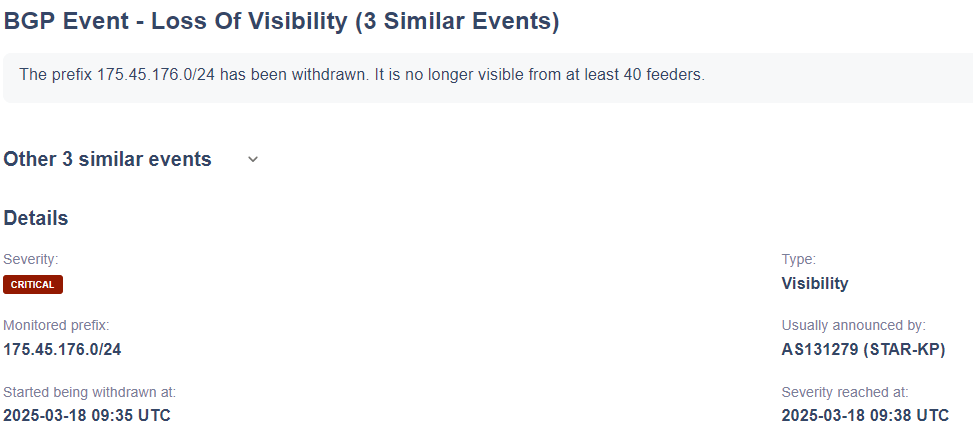
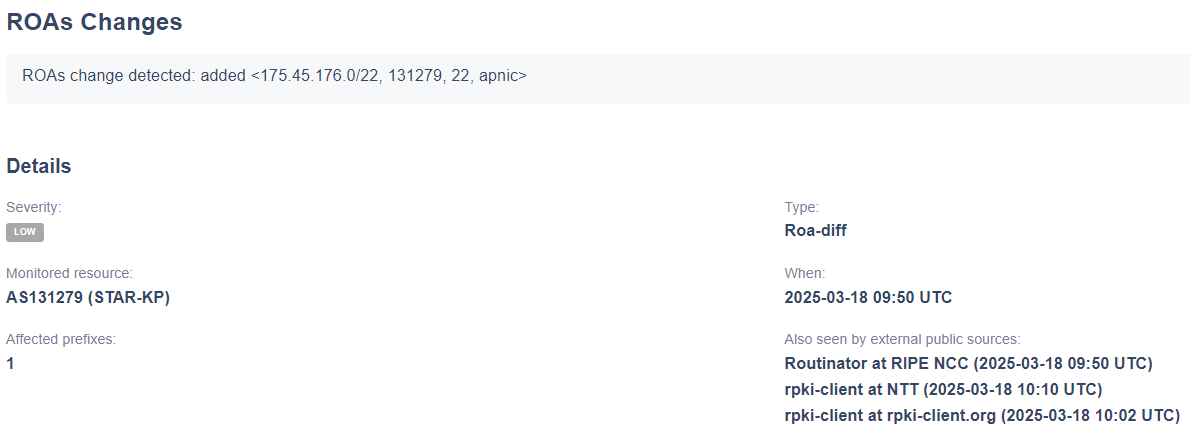
On March 18, 2025, at around 9:38 AM UTC, connectivity to AS131279 dropped. Shortly after, at 9:50 AM UTC, a change in the Start of Authority (SOA) record and an update to the Route Origin Authorization (ROA) were detected.

The update introduced a new ROA for 175.45.176.0/22, authorizing AS131279 as the origin but setting a maximum prefix length of /22. Previously, AS131279 had been announcing four /24s (175.45.176.0/24, 175.45.177.0/24, etc.), which had not been marked as invalid. After the change, these /24s exceeded the allowed length and were classified as RPKI Invalid.

Until these changes are fixed, anything in 175.45.176.0/22 will remain unreachable. Interestingly these errors come almost a month after some unauthorized changes were made: https://nkinternet.com/2025/02/23/north-korea-whois-records-hijacked/

Update

Looks like as of 2025-03-19 02:15 UTC everything is coming back online. It is interesting however that it took 17 hours between when the initial connections dropped and when everything came back online.

Manbang Set Top Box Manual

A short post since 38North has a much longer write up about the Manbang set top box here: https://www.38north.org/2019/02/mwilliams022219/

But I recently came across the manual to the Manbang set top box that was part of an .apk file. The app is corrupted but I was able to extract some of the contents. Specs from the manual are below, as well as the manual and font files used by the app.

Android Version: 4.4

Processor: S805 CPU Cortex A5 Quad-core 1.5GHz

Memory: DDR3 1GB RAM, 8GB internal storage

Video Formats Supported: H.265, H.264, MPEG1/2/4, DivX/Xvid, 3GP, m2ts, MKV, MP4

Audio Formats Supported: MP3, AAC, WMA, MID, OGG, WAV

Image Formats Supported: JPEG, PNG, BMP, GIF, JPG

USB Ports: 2 x USB 2.0

Network Port: 10/100M RJ45 Ethernet

Video Output: HDMI 1.4a, supports 1080 x 720 resolution

What’s interesting is that hte manual lists 8.8.8.8 (Google DNS) and 114.114.114.114 (a Chinese DNS) as configuration options. The manual also states that newly purchased devices must be registered with the Manbang Management Center before it can be used. Outside of that searching can be performed in Korean or English which might suggest that some content has English metadata. There’s also a few images in the docs folder that don’t appear to be used

Manual: Download

Fonts: Download

Hangro: Investigating North Korean VPN Infrastructure Part 1

In a post from a now-deleted user on the webdev subreddit, someone asked about how to acquire a .kp TLD. While there were a few decent responses, the original poster shared an update: they successfully obtained a domain but noted that a VPN is required to access the website. This raised intriguing questions about VPN usage in North Korea.

While several VPN providers claim to operate from North Korea, most merely offer false IP geolocation. However, the poster provided the domain they acquired: hani.star-co.net.kp. This sparked an investigation into what might be legitimate North Korean VPN infrastructure.

Is Hangro a VPN?

North Korea’s tightly controlled internet environment relies on specific tools for access. One such tool is the software NetKey, which authenticates users inside the country for internet access. However, it appears there is another program, Hangro, which may potentially function as a VPN for users outside the country. Let’s dig into the infrastructure a little more

Hangro’s IP Infrastructure

Historically, four IP addresses supported Hangro’s operations. These included two IPs located in North Korea and two in Russia. These IPs shared certificates on port 3225 and also had port 8888 open:

  • 175.45.176.21
  • 175.45.176.22
  • 188.43.136.115
  • 188.43.136.116

Until November 1, 2024, these IPs displayed the following certificate information on port 3225:

  • Subject: CN=hangro.net.kp
  • Issuer: CN=hrra2024
  • Names: hangro.net.kp

Additionally, the IP 175.45.176.32 matched this certificate data.

Despite these technical similarities, the exact purpose of these IPs remains unclear. Further investigation of the domain hangro.net on archive.org reveals a 2012 snapshot of a remote access page written in Korean:

Screenshot of hangro.net from 2012. https://web.archive.org/web/20121231174908/http://www.hangro.net:80/user/login.php

This domain was apparently used for some kind of remote access and is similar to a current North Korean TLD but there’s still more that can be investigated to tie this to North Korea as well as how it is used for remote access.

Whois Records and DPRK Connections

Luckily whois data from that time reveals who had registred hangro.net:

  • Registrar: XIN NET TECHNOLOGY CORPORATION
  • Registrant: Jo Myong Chol
  • Address: “District Heping, Road Wenhua, No 17 4-24-1,” Shenyangshi, Liaoningsheng, China
  • Email: support@silibank.com

Jo Myong Chol is listed as a North Korean national in OpenSanctions. The email address support@silibank.com was also used to register other DPRK-affiliated websites, including:

  • ournation-school.com
  • uriminzogkiri.com

This strongly ties Hangro’s infrastructure to North Korea. The use of silibank.com—a domain associated with other DPRK-related websites—suggests a coordinated effort to manage internet resources and infrastructure tied to state activities. Furthermore, the Shenyang address and registrant details align with known patterns of North Korean operations abroad, further solidifying its connection to the regime’s broader internet strategy.

Silibank and Hangro Software

At this point we can conclude that all of this is related to North Korea but it still doesn’t answer the question about what hangro.net.kp is used for. However, back in 2014 archive.org also captured the following page for silibank.com

https://web.archive.org/web/20141218100818/http://silibank.com/

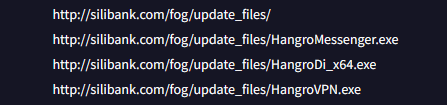
While archive.org doesn’t have a copy of the files, VirusTotal provides us a list of files in the fog directory

Side note if anyone knows what moranbong is or has a copy of the files feel free to reach out.

What is Hangro Used For?

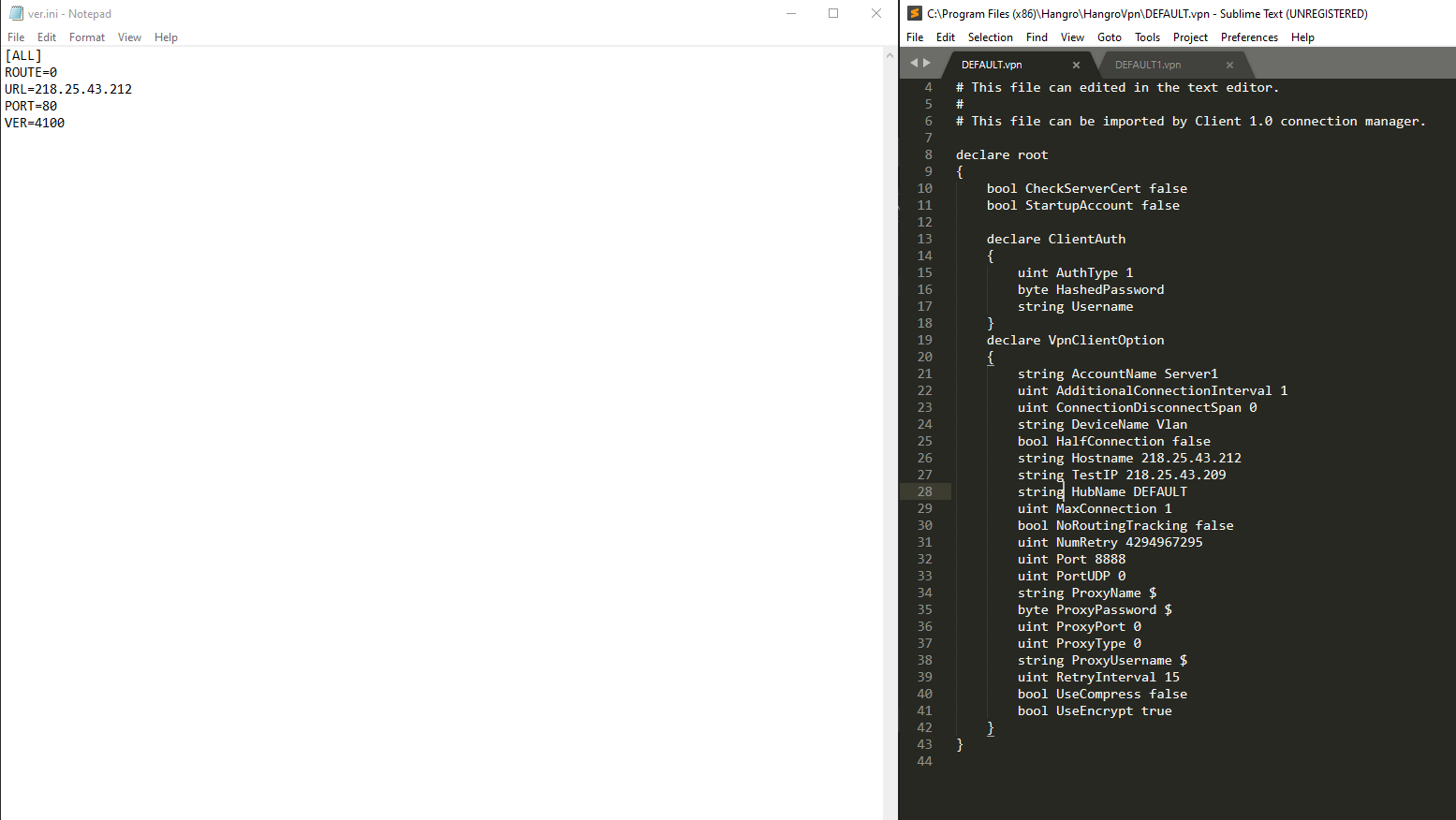
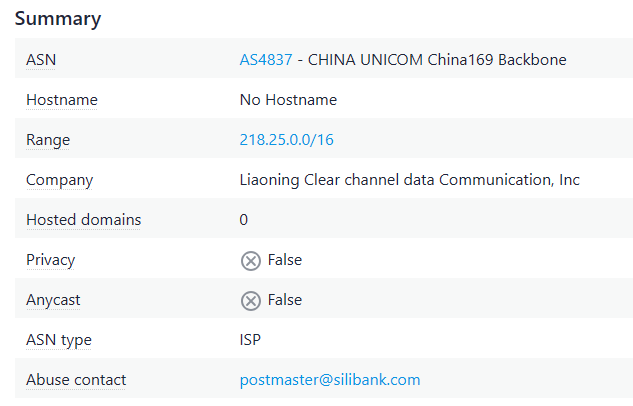
Judging by the name it’s probably a VPN client that was downloaded from silibank.com. While the file on VirusTotal may be an older file I was able to find what I think is a newer version of Hangro. The interesting thing is that it came with a default config in place that is designed to connect back to 218.25.43.212 on port 8888

Pulling some additional details for that IP reveals an abuse contact email of postmaster@silibank.com

What does this all mean? It seems to be some infrastructure used for possibly connecting back to the Kwangmyong potentially. There’s not a lot of information available online about the Hangro software. So far the only thing that I’ve been able to find is this article from rfa.org that claims the following:

“The newly developed computer startup program detects the internet connection status in real time and opens a channel to use only North Korean e-mail. You can download instructions from Pyongyang, and access lecture materials and study materials only through North Korean e-mail,” the second source said.

“The software, called ‘Hangro,’ disables external emails from China and the rest of the world. It has become the only email channel where messages can be exchanged between the North Korean authorities and the company,” said the second source.

“North Korean trading companies must pay $350 to the Shenyang consulate to use Hangro,” the second source said.

https://www.rfa.org/english/news/korea/smartphone_surveillance-09202022164642.html

Looking Ahead: Part 2 Preview

While the article mentions it is used for just email, some brief investigation of the software reveals that there may be more to it. Part 2 of this series will have additional details about the software. Further, it appears that North Korea is using infrastructure outside of it’s typical ASN. Doing some quick digging into the 188 addresses shows the following ranges in the RIPE database as being related to the 188 IP addresses.

Indicators mentioned in this post are below. If you have any additional details about Hangro please reach out contact@dprkinternetwatch.com

Indicators:

  • 175.45.176.21
  • 175.45.176.22
  • 175.45.176.32
  • 188.43.136.115
  • 188.43.136.116
  • 218.25.43.212
  • hangro.net.kp
  • hangro.net
  • silibank.com

  • ournation-school.com

  • uriminzogkiri.com
  • support@silibank.com
  • postmaster@silibank.com

Inspecting North Korea’s Digital Map App: Licensing & API Insights

I’ve been meaning to write this for a while but it turned into a much longer write up than I was expecting so it’s being broken into multiple parts. Martyn at 38 North did a great write up on the app earlier this year but I wanted to dive into it more. If you’re not familiar with the app you can read about it here: https://www.38north.org/2024/01/a-close-up-look-at-north-koreas-digital-map-app/

Lets take a look at some of the icons first. They give some clues to some of the possible items that might be found on the map

There’s also a couple of interesting icons that don’t appear to be used anywhere

If you’re also not familiar, apps in North Korea are signed I wrote a blog post a few months ago when I received the app on how to work around the signature: https://wordpress.com/post/nkinternet.wordpress.com/436

With that out of the way, let’s take a deeper look at the app and some of the functionality.

Multiple locations on the map and checks notes, what appears to be Pyongyang’s finest Italian restaurant

App Licensing
There’s a pretty robust system for checking the license of the app. Interestingly there’s a function for scanning a QR code to process a license file for the app:

public
void handleDecode(Result result, Bitmap bitmap, float scale) {
  this.strResult = ResultParser.parseResult(result).toString();
  if (this.capture_type == 85) {
    try {
      if (!((Boolean)Class.forName("com.shitc.license.ProductLicense")
                .getMethod("write2File", byte[].class)
                .invoke(null, Base64.decode(this.strResult, 0)))
               .booleanValue()) {
        throw new Exception();
      }
      Toast
          .makeText(this, "QR License Applied Successfully", Toast.LENGTH_SHORT)
          .show();
    } catch (Exception e) {
      Toast.makeText(this, "License Application Failed", Toast.LENGTH_SHORT)
          .show();
    }
  }
}

Once scanned, there’s some additional licensing checks that are performed for files on the phone that include:

public boolean checkCertFiles() {
  boolean isValid = false;
  try {
    InputStream certStream = parentContext.getAssets().open("AllCerts.cert");
    DataInputStream dataStream = new DataInputStream(certStream);
    byte[] certData = new byte[dataStream.available()];
    dataStream.read(certData);
    dataStream.close();

Finally it checks the date to make sure that it’s not later than December 31, 2020. There’s additional methods for making sure that the system time wasn’t modified but apparently doesn’t work that great.

public boolean isLicenseValid() {
  Date currentDate = new Date(System.currentTimeMillis());
  Date expirationDate = new Date(2020 - 1900, 12 - 1, 31, 23, 59, 59);
  return !currentDate.after(expirationDate);
}

Additionally there is a file shitc_prefs that is a file containing licensing information about whether there is a valid license present.

If some of these controls fail like the date, the app fails to start. For others the app remains in a “demo” state. Based on all of the checks nResultCode is set to a value that can be checked throughout the app for additional functionality that can be unlocked. Based on a read through a rough breakdown of the possible codes are:

  • nResultCode = 0: Indicates that the license is valid and has passed all checks.
  • nResultCode = 1: This seems to indicate a problem finding the necessary license files or data.
  • nResultCode = 2: This means that the app found the license files, but they were either not valid or didn’t match the expected values during decryption or signature validation. This is set when internal checks fail.
  • nResultCode = 3: QR code data was processed the app could not validate or save the license properly keeping it in demo mode. This could happen for multiple reasons if the files are missing or if there is an issue accessing shitc_prefs.
  • nResultCode = 4: Possibly related to the inability to initialize or load the license properly.
  • nResultCode = 5: This result seems tied to license expiration, as it is set when the system detects that the current date is beyond the expiration date.
  • nResultCode = 6: This is related to the certificate validation and indicates that the certificates may be missing, corrupted, or altered.

nResultCode being set to 2 or 5 results in System.exit(0) being called stopping execution of the app after the splash screen is displayed.

Options to share via Bluetooth and 3G and a third unknown option that lets you enter an address

API Calls
The app makes multiple calls to a single API endpoint in the country http://10.99.1.100/friend_api.php

There’s a call to the API to send some feedback to the server

public AsyncTaskC0230ah(FeedbackActivity feedbackActivity) {
    this.a = feedbackActivity;
    this.b = new ProgressDialog(this.a, 2);
    this.b.setMessage("봉사기접속중...");
    this.b.setCancelable(false);
    this.b.show();
}

public Integer doInBackground(String... strArr) {
    Throwable th;
    int i;
    String str = strArr[0];
    StringBuilder e = new StringBuilder(String.valueOf(C0241as.c)).append("?type=100&data=");
    HttpURLConnection a = C0241as.a(e.append(str).toString());

There’s also code for what looks to be sending additional data to the server using type4

private static Integer a(String... strArr) {
    int i;
    HttpURLConnection a = C0241as.a(String.valueOf(C0241as.c) + ("?type=4&data=" + strArr[0]));
    if (a == null) {
        return -1;
    }

This looks to return an int between 1-3 and is used for indicating success, failure, or an invalid user?

if (str2.equals("1")) {
  i = 0;
  if (e != 0) {
    try {
      e.close();
    } catch (IOException e2) {
      e = e2;
    }
  }
  if (a != null) {
    a.disconnect();
  }

There’s also a request of type3 that returns JSON data:

InputStream inputStream2;
HttpURLConnection a = C0241as.a(String.valueOf(C0241as.c) + ("?type=3&data=" + strArr[0]));

Based on the data returned it looks like the JSON object is parsed for additional details:

rVar.a = jSONObject.getInt("PID");
rVar.c = jSONObject.getString("TELPHONE");
rVar.d = jSONObject.getString("POSITION");
rVar.f = jSONObject.getString("MESSAGE");
rVar.e = jSONObject.getString("REGDATETIME");
rVar.a(rVar.e);
rVar.g = jSONObject.getString("VERSION");
this.e.add(rVar);

It appears the API is a multi-purpose API. Still need to see what else the API is used for within the app.

Bus and subway routes across the city are searchable

Map Database
Probably the most interesting part of the app. the function intiGeoDB intitializes the database that is used to load the icons onto the map. The method calls sqliteOpen with the parameter str being the most likely candidate of the password being passed to sqliteOpen

public void initGeoDB(String str) {
    com.samhung.pyongyangcity2.e.a.a(this);
    String str2 = SamHungApplication.b;
    if (SamHungApplication.c.isEmpty()) {
        str2 = getDatabasePath(C0241as.a).getPath().replace("/" + C0241as.a, "");
        SamHungApplication.c = String.valueOf(str2) + "/font";
        SamHungApplication.d = String.valueOf(str2) + "/symbol";
    }
    String str3 = SamHungApplication.c;
    String str4 = SamHungApplication.d;
    com.samhung.pyongyangcity2.a.b.a().a(str2, com.rgitc.a.a.b, str);
    int sqliteOpen = NativeLib.sqliteOpen(str2, com.rgitc.a.a.b, str, str3, str4);
    if (sqliteOpen > 0) {
        Log.e("py", new StringBuilder().append(sqliteOpen).toString());
    }
}

Unfortunately sqlite is part of the library file libPyongYangMap3D.so which is 3+ million lines decompiled. Still working on finding the password for the DB. However it could be something that is encoded as there are several methods that use XOR obfuscation in the app:

public static String a() {
  byte[] bArr = {Byte.MIN_VALUE, -89, -38, -61, 115, -112};
  byte[] bArr2 = {12, 48, 76, 72, -17, 66};
  for (int i = 0; i < bArr.length; i++) {
    bArr[i] = (byte) (bArr[i] ^ bArr2[i]);
    bArr[i] = (byte) (bArr[i] ^ (-1));
  }
  try {
    return new String(bArr, 0, bArr.length, "UTF-8");
  } catch (UnsupportedEncodingException e) {
    e.printStackTrace();
    return "";
  }
}

3rd Party Libraries

There’s a couple of compiled .so files that are used with the app. The one called libjsqlite.so has some additional information that can be used to make some assumptions. Based on a file hash in file it appears that the app is using Sqlite 3.25.2: https://www3.sqlite.org/src/info/fb90e7189ae6d62e

It also appears that it’s built using this GitHub project: https://github.com/geopaparazzi/libjsqlite-spatialite-android?tab=readme-ov-file

Next Steps
It’s an interesting app to get an idea of the types of landmarks inside Pyongyang. There’s more functionality to explore in the app for a part 2 and probably part 3. There’s a PDF reader/generator in there, a database password to find, and more calls to the friend API.

Investigating korfilm.com.kp DNS Errors

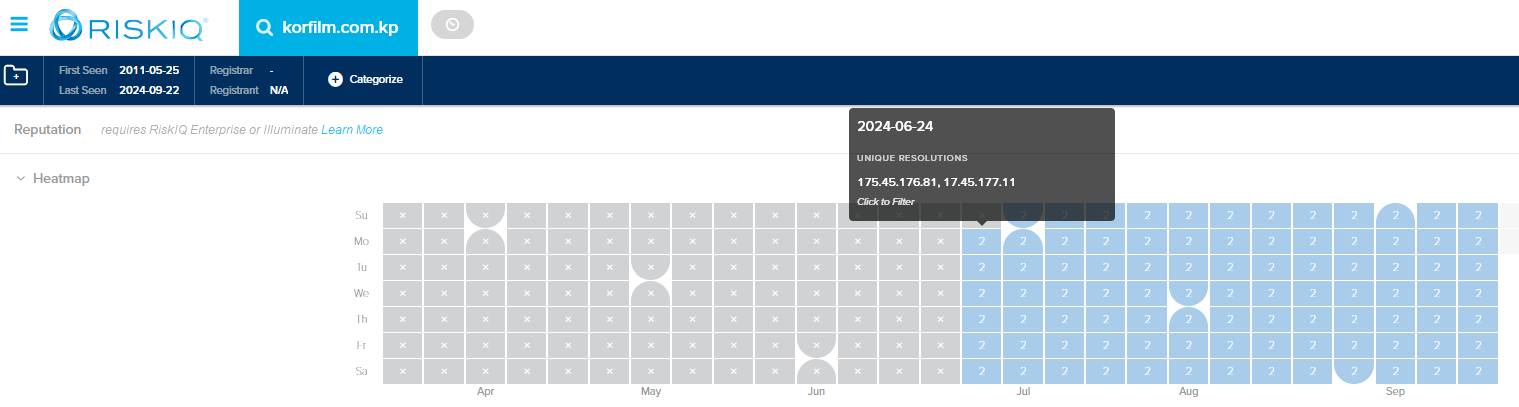
There’s an interesting DNS misconfiguration for korfilm.com.kp, the website for the Korea Film Export & Import Corporation. It appears that someone made a typo when configuring the DNS records leading to one of the entries pointing to an Apple owned IP instead of a North Korean one.

This is the current A record for korfim.com.kp:

$ dig korfilm.com.kp a
; <<>> DiG 9.10.6 <<>> korfilm.com.kp a
;; global options: +cmd
;; Got answer:
;; ->>HEADER<<- opcode: QUERY, status: NOERROR, id: 20685
;; flags: qr rd ra; QUERY: 1, ANSWER: 2, AUTHORITY: 0, ADDITIONAL: 1

;; OPT PSEUDOSECTION:
; EDNS: version: 0, flags:; udp: 4096
;; QUESTION SECTION:
;korfilm.com.kp. IN A

;; ANSWER SECTION:
korfilm.com.kp. 27819 IN A 175.45.176.81
korfilm.com.kp. 27819 IN A 17.45.177.11

Querying the DNS servers directly confirms that both are showing the misconfiguration.

$ dig @ns1.korfilm.com.kp korfilm.com.kp a +short
175.45.176.81
17.45.177.11
$ dig @ns2.korfilm.com.kp korfilm.com.kp a +short
175.45.176.81
17.45.177.11

Obviously not a great mistake as this can cause traffic meant for the domain to be routed to Apple’s IP. The earliest evidence that I can find shows this misconfiguration has been in place since June 2024

Thanks to marco@marcopisco.com for the tip about the misconfiguration

Exploring the North Korean Email Client: Features and Functionality

Now that it’s been leaked, lets take a look at the North Korean email client that was part of the leak. It’s made up of a main executable, a couple of dll files, and a config file. Before even diving into it there’s a couple of interesting things that we can find looking at the strings and some of the associated file names.

.rdata:006E1E80 0000001C C Not a valid Chilkat object.
.rdata:006E2004 00000025 C VHJpYWwgcGVyaW9kIGhhcyBleHBpcmVkLg==
.rdata:006E2030 00000059 C UHJvZHVjdCBpcyBub3QgdW5sb2NrZWQuICBNYWtlIHN1cmUgdG8gY2FsbCBVbmxvY2tDb21wb25lbnQgZmlyc3Qu
.rdata:006E5A88 00000047 C AutoFix: SMTP port 587 requires explicit SSL/TLS for this mail server.
.rdata:007366D8 0000001F C No SSH connection established!
.rdata:007366F8 00000024 C SSH password authentication failed

So it’s using the Chilkat library and there’s references to SSH, FTP, and other protocols in there as well. The base64 encoded strings are decoded to being about an invalid license. If you’re not familiar with Chilkat, it is a cross-language, cross-platform API providing 90+ classes for many Internet protocols, formats, and algorithms.

And while Google Translate is great, based on the file names for the icons we can get an idea of how the software works when connected to a mail client.

There’s also an icon for a question that I haven’t seen in use yet.

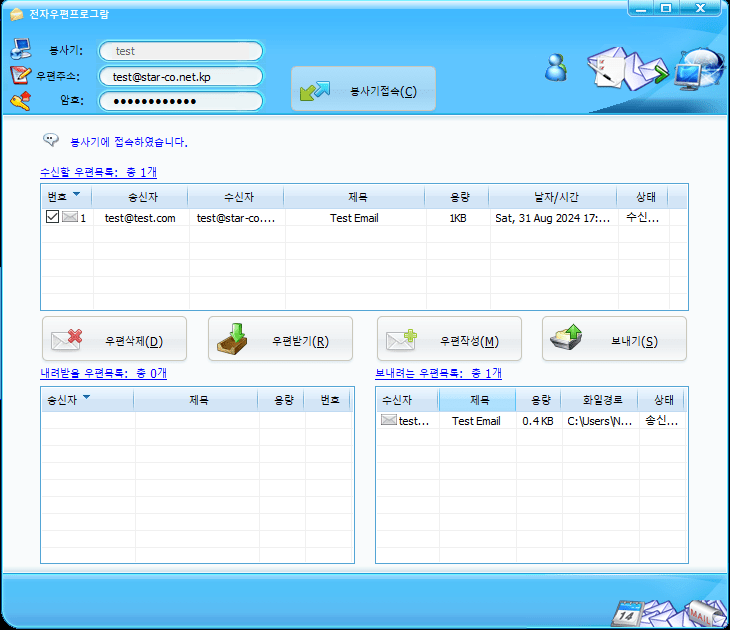
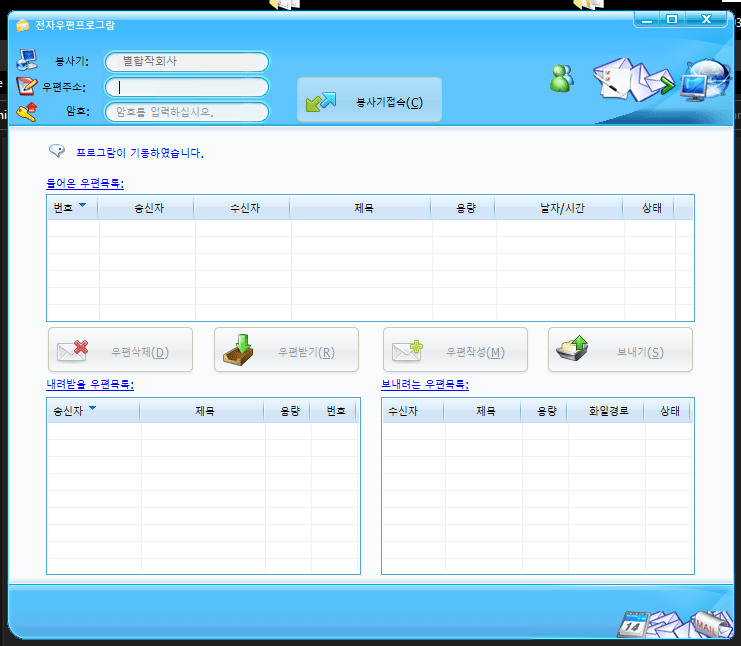
Running the software we can see that it’s a pretty simple interface for an email client.

Checking the temp files as it’s running gives some more information about the UI. While it looks like someone has taken over the domain using the Wayback Machine we can see that uieasy.com is described as “a powerful library to help you develop the user interface program. It uses xml files to describe the look and feel of the control and you can make fancy user interface easily. “. However the last active snapshot on the Wayback Machine is from 2014. If this is email client is still in use it could have been in use for a long time now potentially.

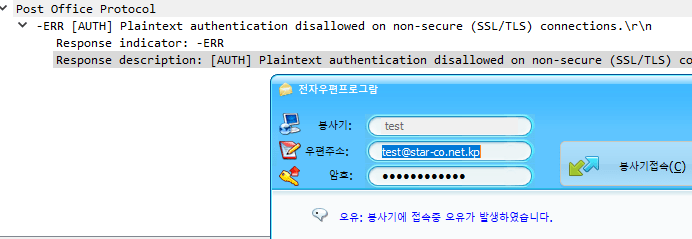
I set up my own email server to see how this works since there are references to SSH and FTP. Two things right away that were a pain is that it only support usernames @star-co.net.kp and there really aren’t good error messages when trying to set up the client, even though it looks like there’s plenty of strings to support an error message but I suppose they’re all in English and not Korean.

I worked out the errors. If you want to test this out on your own I’ve uploaded a dockerfile that you can use that builds with all the correct settings. You can log in with the username ‘test@star-co.net.kp’ and the password is ‘yourpassword’

https://nkinternet.com/wp-content/uploads/2024/09/docker_netstar_email_server.zip

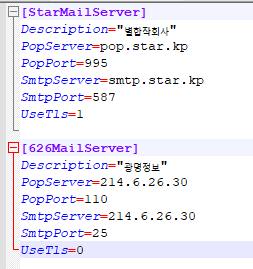
You also have to use a star-co.net.kp domain when entering the username in the email program or else it rejects it. There’s a config file as well for setting the mail server to connect to. The default config that it shipped with is interesting. There’s an entry for a North Korean domain but the second entry is titled 626MailServer and has the server set to the IP address 214.6.26.30 which is owned by the Department of Defense. Could be interesting, could just be on a network that is using DoD IP’s for their internal IP’s

Once the email client authenticates the rest of the buttons become available. There’s options to write an email as well as download an email. It looks like this is designed for being used offline. The bottom left box is for storing emails that come in to a users inbox and the bottom right looks to be an outbox for when connected to the internet you can send emails.

Overall it appears to be a pretty standard email client. It’s interesting that there is some functionality for apparently working in locations without internet access. Probably going to have a second part to this after looking into the dll an db file a little more.

Files:
e3144b16b70ca666abcafdcef98b0ea9 MailClient.exe
16e8287667a1db5b5645531029d3dfc3 dskinliteud.dll
00fb7dc1c20bc169f